> ## Documentation Index
> Fetch the complete documentation index at: https://docs.sharethat.co/llms.txt
> Use this file to discover all available pages before exploring further.
# Payouts
> A deep dive into how payouts work on ShareThat.
ShareThat uses [Stripe](https://www.stripe.com) to process payments, store payment methods, and issue payouts. Stripe is a level 1 PCI Service Provider which is the most stringent level of certification available in the payments industry. You can read more about security at Stripe [here](https://docs.stripe.com/security).
## Payouts Overview
#### Pay Transparency Policy
One of our top priorities is ensuring that you get paid the right amount, on time. With ShareThat, the amount you expect to receive is the actual amount you will receive. Pay cuts aren't possible on ShareThat.
If you have any ideas for improving pay transparency on ShareThat, please let us know in the `#suggestions` channel in our [Discord server](https://discord.gg/RfXEwUjVuw).
#### Our Pricing
We take a flat **8% fee** from the income you earn on ShareThat. There are no additional hidden fees or upfront costs. The **Total earnings**, **Earnings this month**, and **Projected earnings** numbers shown on the dashboard all include our 8% fee, thus, the amount you see is the exact amount you get.
ShareThat was built for clippers by clippers. We don't make money unless you make money.
We support payouts in 118 countries.
## Stripe Express
Learn how to set up a Stripe Express account [here](/clippers/onboarding). Click **Manage** under **Payout Details** at [https://app.sharethat.co/clippers/settings/payoutDetails](https://app.sharethat.co/clippers/settings/payoutDetails) to log into Stripe Express. Quickly access your payout information, edit your payout account, and track your earnings.
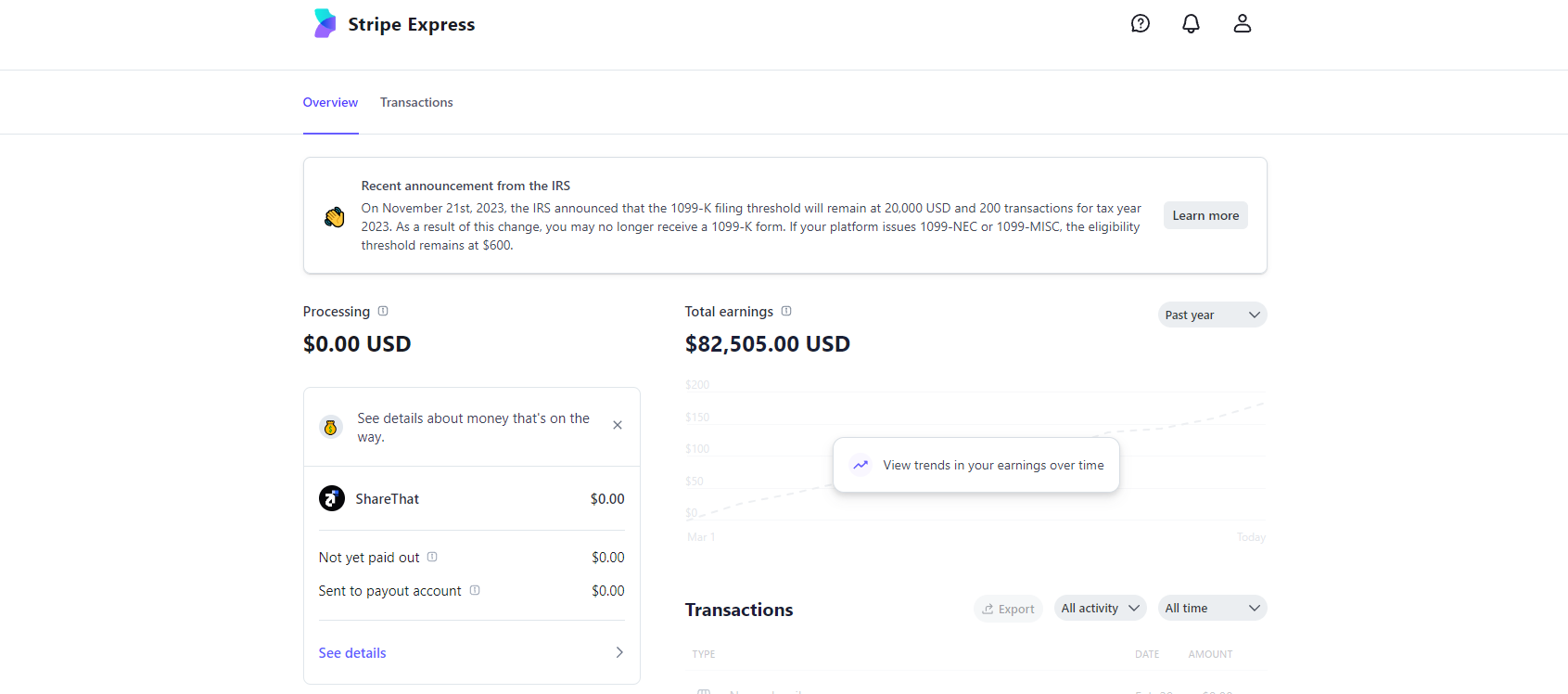 You have to be age 18+ to create a Stripe Express account. If you are under 18, please ask a parent or guardian to help you set up your account.
## Tracking Your Payout
The payouts page shows you where your money is.
* **Stats:** See what your total earnings are, how much you made this month, and how much you can expect to make from active cycles.
* **Cycle Status:** If you click on a cycle, the status of that cycle will appear and show where your money is in real-time. Here's what each status means:
You have to be age 18+ to create a Stripe Express account. If you are under 18, please ask a parent or guardian to help you set up your account.
## Tracking Your Payout
The payouts page shows you where your money is.
* **Stats:** See what your total earnings are, how much you made this month, and how much you can expect to make from active cycles.
* **Cycle Status:** If you click on a cycle, the status of that cycle will appear and show where your money is in real-time. Here's what each status means:
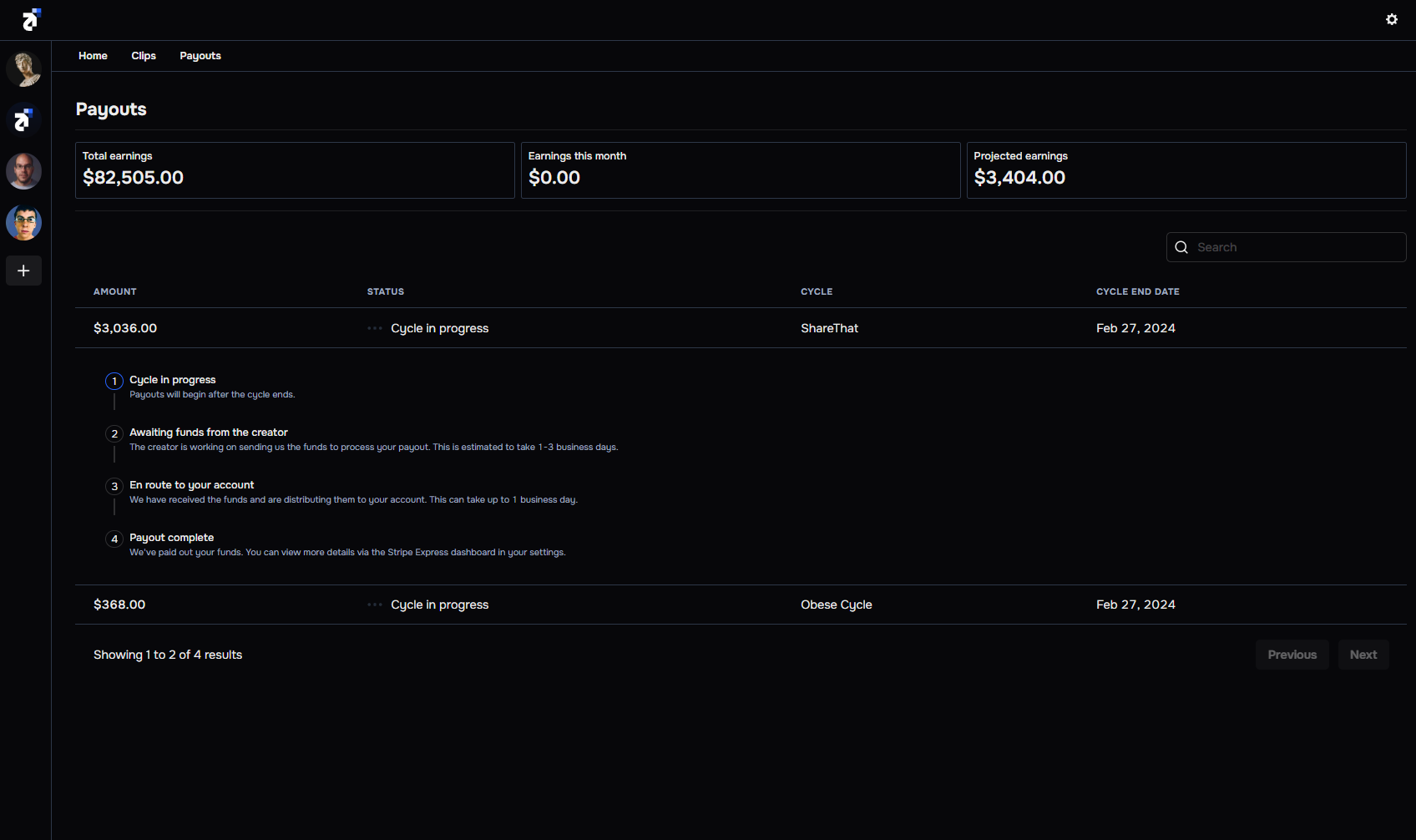 The cycle is actively accepting submissions.
The creator is working on sending us the funds to process your payout.
We have received the funds and are distributing them to your account. This can take up to 1 business day.
We've paid out your funds. You can view more details via the Stripe Express dashboard in your settings.
## Taxes
If you earn \$600 or more on ShareThat, you may receive a 1099-NEC tax form (if eligible). If you meet the requirement, Stripe will send you an email asking you to provide tax information. You will receive the form electronically and have the option to receive it physically by mail as well. More information is available [here](https://www.irs.gov/instructions/i1099mec).
The cycle is actively accepting submissions.
The creator is working on sending us the funds to process your payout.
We have received the funds and are distributing them to your account. This can take up to 1 business day.
We've paid out your funds. You can view more details via the Stripe Express dashboard in your settings.
## Taxes
If you earn \$600 or more on ShareThat, you may receive a 1099-NEC tax form (if eligible). If you meet the requirement, Stripe will send you an email asking you to provide tax information. You will receive the form electronically and have the option to receive it physically by mail as well. More information is available [here](https://www.irs.gov/instructions/i1099mec).